Playbook · Email deliverability
Email deliverability for cold email
Land in the inbox before you write a word: domains, authentication, warm-up and the rules Gmail and Yahoo enforce.
- Time
- One afternoon, then 3 to 5 weeks of warm-up
- Tools
- Free RevOps Lab tools, your mailbox provider, a sequencer
- You get
- Cold email that reaches the inbox
What is email deliverability?
Email deliverability is whether your emails reach the inbox. For cold email it rests on five things: separate sending domains, SPF, DKIM and DMARC on each, a warm-up period, clean lists and sending within limits. Since February 2024 Gmail and Yahoo enforce these rules, so a missing record now means the spam folder, not a slightly lower open rate.
Trust
Authenticated
SPF, DKIM and DMARC prove the email is really from you.
Reputation
Warmed and protected
Separate domains, a slow start and steady volume.
Behaviour
Wanted
Clean lists, few bounces, almost no complaints.
Blueprint: the sending setup
Everything that touches a cold email, in the order you set it up.
- Sending domainsSeparate from your main domain
- Mailboxes2 to 3 per domain
- AuthenticationSPF, DKIM, DMARC, MX
- Warm-up3 to 5 weeks
- Verified listNo invalid or risky addresses
- Send within limitsAbout 30 per mailbox a day
- Weekly monitoringBounces, complaints, blacklists
- Buy separate sending domains.Look-alike domains of your brand, for example getyourcompany.com. One domain per 2 to 3 mailboxes, plus a spare.
- Point each domain at your website.Redirect it to your main site so anyone who checks finds a real company.
- Create the mailboxes.Real names, real profile photos, in Google Workspace or Microsoft 365.
- Publish SPF, DKIM, DMARC and MX.Use the generators, then run the deliverability test until every card passes.
- Warm up for three to five weeks.Follow the schedule below and keep warm-up running afterwards.
- Verify the list.Remove invalid, risky and role addresses before the first send.
- Send within limits.Around 30 cold emails per mailbox per day, plain text, one link at most.
- Monitor weekly.Bounces, replies, complaints, blacklists and DMARC reports.
Domains and mailboxes
Never send cold email from your main domain: if its reputation drops, invoices and customer replies go to spam too. Count mailboxes from your daily volume, then domains from mailboxes. The inbox calculator does the maths, including a spare domain and the first send date.
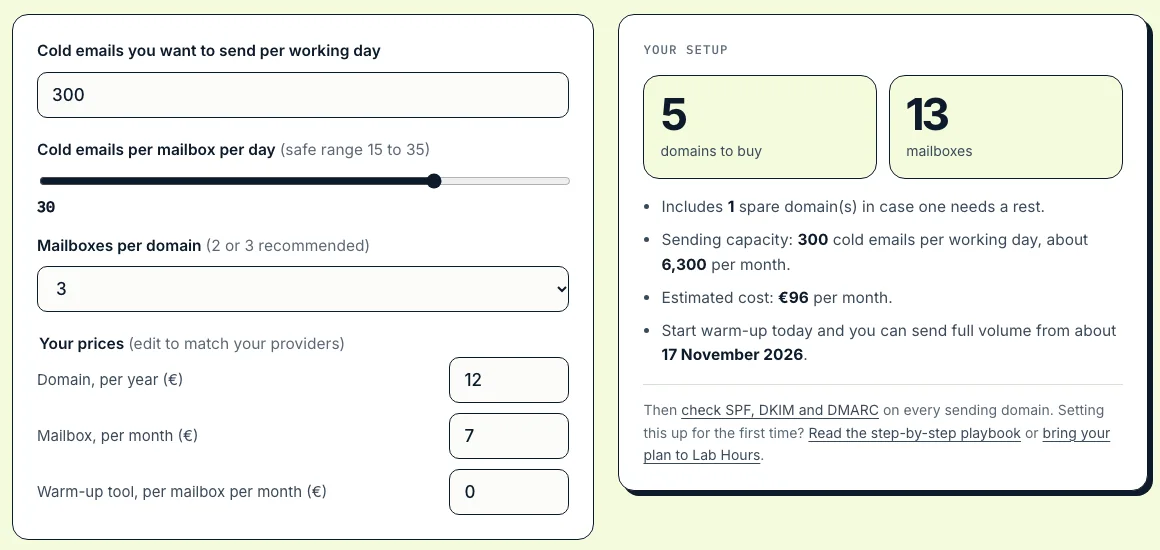
Live screenshot of the free inbox calculator. Prices are editable defaults; use your providers’ prices.
SPF, DKIM and DMARC
Three DNS records prove an email really comes from you. Publish them on every sending domain, then test until every card passes.
SPF
Who may send
One TXT record, every sending tool as an include, 10 DNS lookups at most.
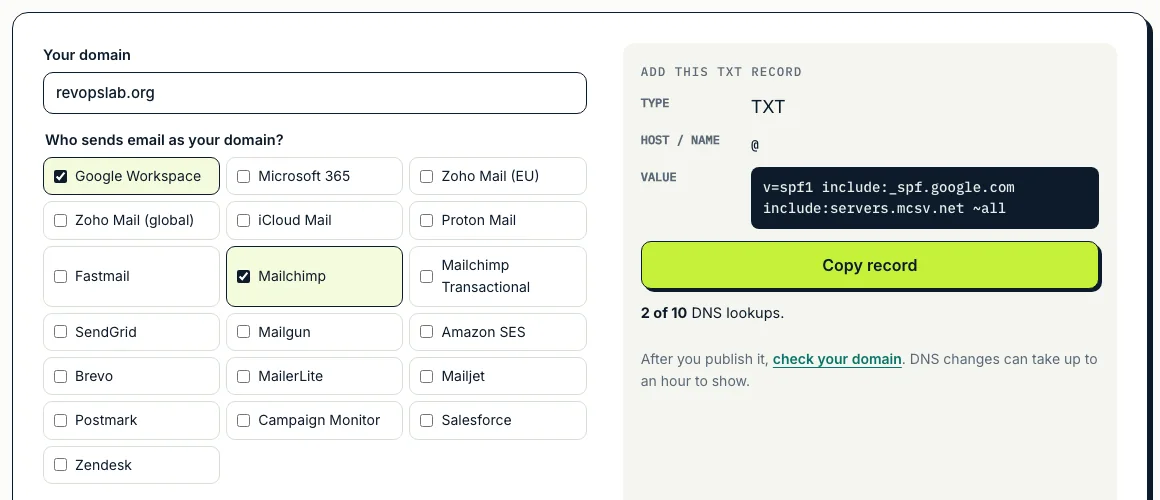
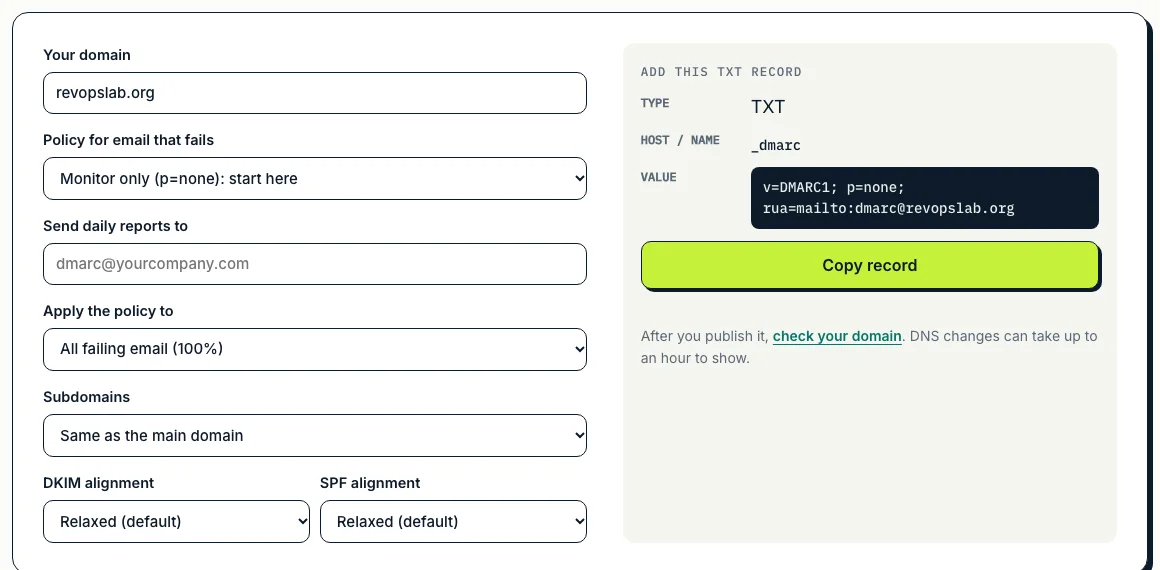
Then test the domain. The example below is revopslab.org, which is deliberately set up as a domain that never sends email: SPF v=spf1 -all and DMARC p=reject block anyone sending as it, and it has no MX. A sending domain needs the opposite: an include for each tool, DKIM keys and MX records.
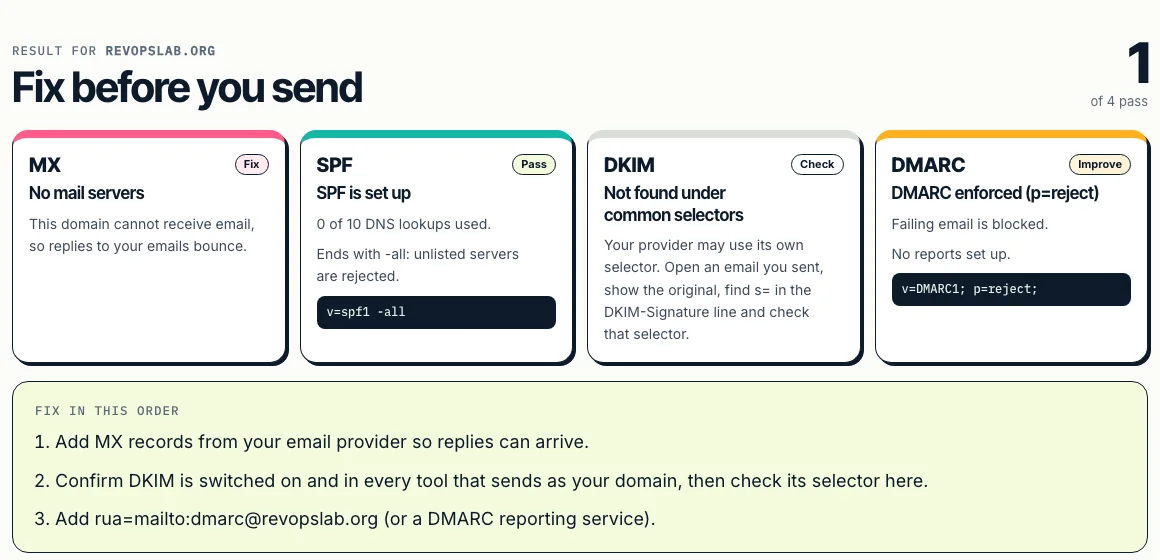
Live screenshot of the free email deliverability test, 13 October 2026.
Warm-up
New mailboxes have no reputation. Build it slowly with real-looking conversations before cold volume, and keep warm-up running afterwards.
| Week | Warm-up emails | Cold emails |
|---|---|---|
| Week 1 | 5 to 10 | None |
| Week 2 | 10 to 20 | None |
| Week 3 | 20 to 30 | Up to 10 |
| Week 4 | 30 to 40 | 10 to 20 |
| Week 5 on | Keep warm-up running | 20 to 30, never above about 50 |
Lists and bounces
Bounces tell inbox providers you are guessing addresses. Verify every list before sending, remove role addresses such as info@ and sales@ from cold campaigns, and stop a campaign if bounces climb. Many practitioners keep bounces below about 2 percent. Never buy lists: old lists contain spam traps, addresses that exist only to catch senders who never cleaned their data.
Gmail and Yahoo rules
What inbox providers require since February 2024. Cold email teams reach the bulk threshold quickly across mailboxes, so treat the bulk rules as the standard.
| Rule | Who | Requirement |
|---|---|---|
| SPF or DKIM | All senders | Required |
| SPF and DKIM | Bulk senders (about 5,000 a day to Gmail) | Required |
| DMARC, at least p=none | Bulk senders | Required |
| From domain aligned with SPF or DKIM | Bulk senders | Required |
| One-click unsubscribe | Bulk senders, marketing email | Required |
| Spam complaint rate | All senders | Below 0.3 percent; Google advises staying below 0.1 |
Source: Google email sender guidelines.
Monitor every week
Five checks, ten minutes: bounce rate, reply rate per mailbox, spam complaints in Google Postmaster Tools, DMARC reports, and blacklists. The blacklist check tests 25 public lists live and links to Spamhaus, URIBL and SURBL, which refuse lookups through public DNS.
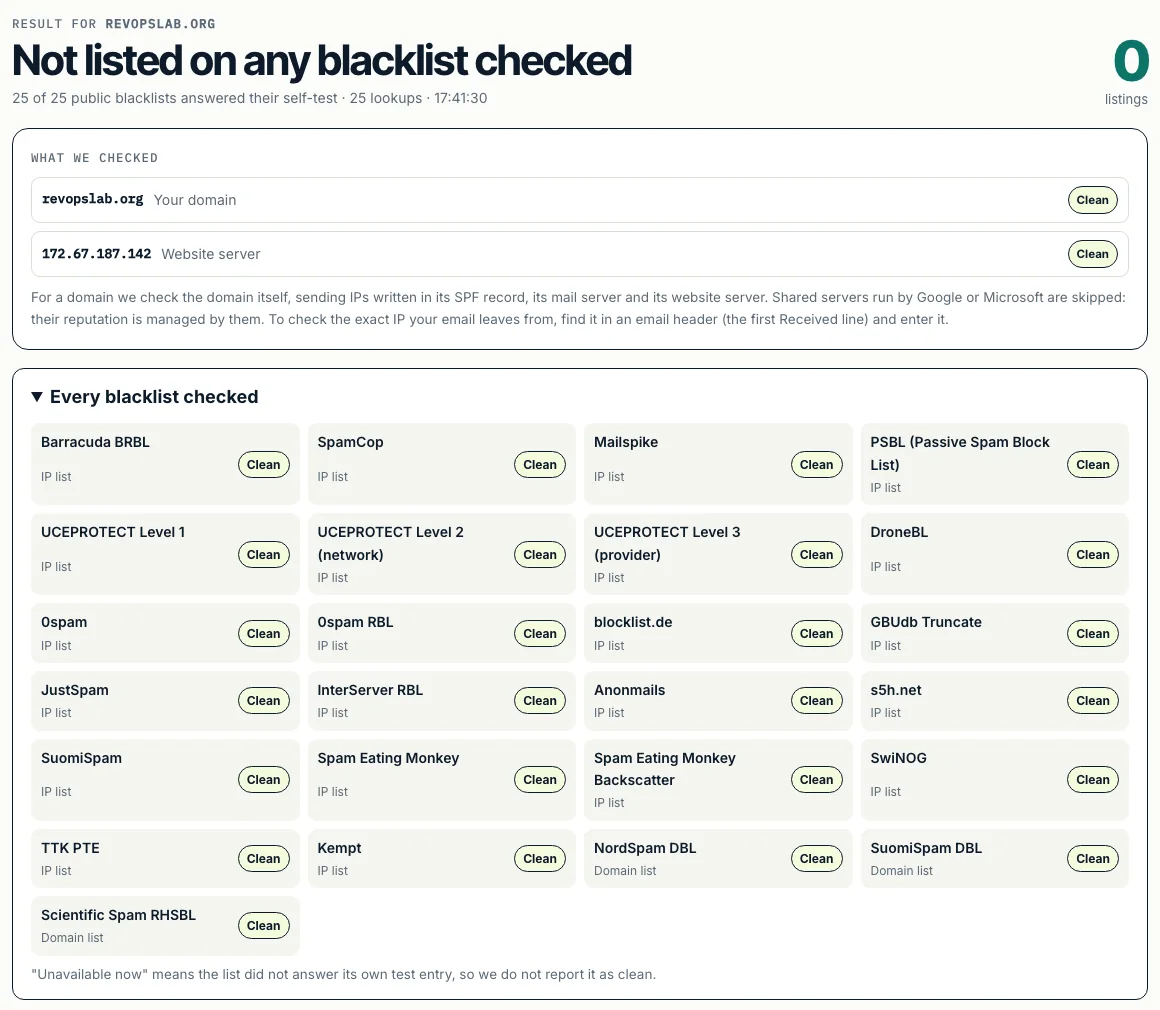
Live screenshot of the free blacklist check, 13 October 2026.
What goes wrong
- Two SPF records. Adding a new TXT record for each tool breaks SPF for every email. Merge them.
- DKIM only on the mailbox. The sequencer or newsletter tool also needs its own DKIM, signing with your domain.
- Skipping warm-up. New mailboxes sending 50 cold emails on day one end up in spam within days.
- One mailbox, high volume. Spread volume across mailboxes and domains instead.
- Links and images in the first email. Plain text, one link at most, no attachments.
- No MX on sending domains. Replies bounce and the domain looks less trustworthy. Check it with the MX lookup.
Questions people ask
How do I know if my emails are going to spam?
Send a test to a Gmail and an Outlook inbox you own and see where it lands. Check your spam rate in Google Postmaster Tools: Gmail requires bulk senders to stay below 0.3% and recommends below 0.1%. Then run the free deliverability test and blacklist check on this site: a missing record or a listed IP explains most sudden drops.
How do I improve cold email deliverability?
Send from separate domains, authenticate each with SPF, DKIM and DMARC, warm new mailboxes for three to five weeks, verify every list, stay around 30 cold emails per mailbox per day, write plain short emails, and watch bounces, complaints and blacklists every week.
How long should I warm up a new email domain?
Plan three to five weeks before sending real cold volume, starting at 5 to 10 emails a day per mailbox and rising each week. Keep warm-up running afterwards.
How many cold emails can I send per day per mailbox?
Most practitioners stay between 15 and 35 cold emails per mailbox per day after warm-up. Add mailboxes and domains to send more, rather than pushing one mailbox harder.
Should I send cold email from my main domain?
No. If it gets a poor reputation, your normal business email, invoices and customer replies can land in spam too. Use separate look-alike domains with the same care as the main one.
Related